
If your Kia key fob suddenly stops working properly, responds slowly, or requires multiple button presses, the battery is likely running low. Fortunately, replacing the battery in a Kia key fob is quick, simple, and inexpensive. Most Kia owners can complete the process in less than 10 minutes with only a small screwdriver and a replacement battery.
In this guide, you’ll learn how to change the battery in a Kia key fob step by step, which battery type you need, and helpful tips to avoid damaging your remote.
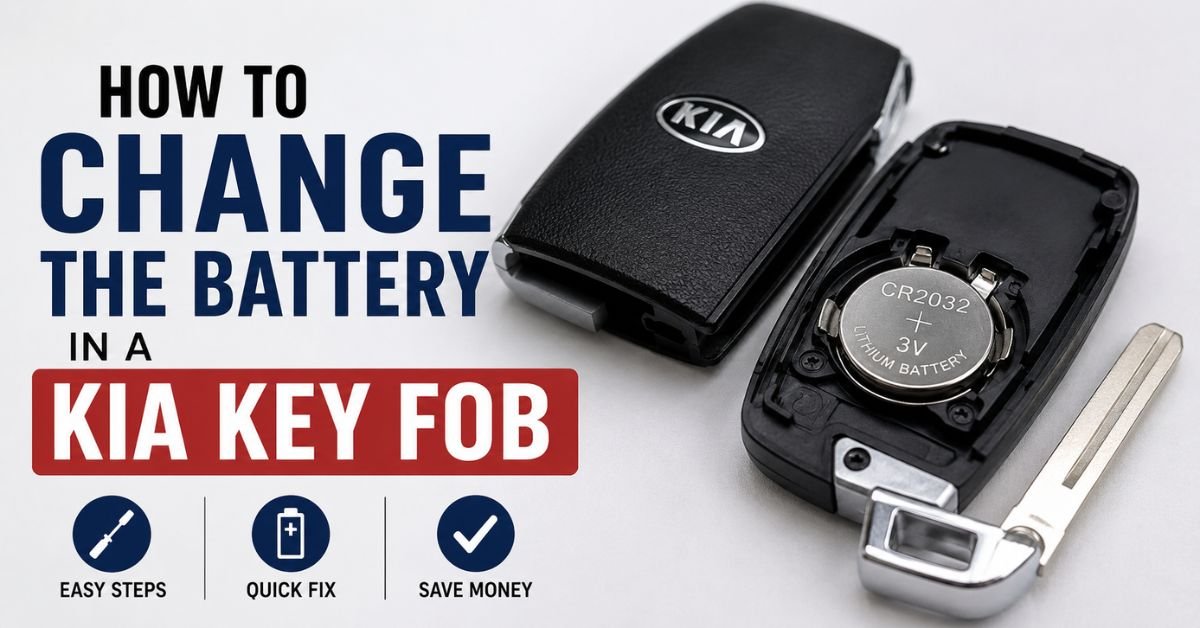
How to Change the Battery in a Kia Key Fob
Signs Your Kia Key Fob Battery Needs Replacement
Before the battery dies completely, your key fob usually gives a few warning signs. Common symptoms include:
- Reduced remote range
- Delayed response when locking or unlocking doors
- Push-button start not detecting the key immediately
- Intermittent operation
- Dashboard warning messages related to the smart key system
If you notice any of these problems, replacing the battery is usually the easiest solution.
What Kind of Battery Is Needed for a Kia Key Fob?
Most modern Kia key fobs use a small coin-style lithium battery. The most common battery types are:
- CR2032
- CR2025
The exact battery depends on your Kia model and year. You can check your owner’s manual or inspect the old battery after opening the fob.
Popular Kia models that commonly use these batteries include:
- Kia Forte
- Kia Sportage
- Kia Sorento
- Kia Telluride
- Kia Soul
- Kia Optima
- Kia K5
Always use a high-quality replacement battery from a trusted brand for the best performance.
Tools You May Need
Replacing the battery is simple and usually requires only a few items:
- New CR2032 or CR2025 battery
- Small flathead screwdriver
- Plastic pry tool (optional)
- Soft cloth or towel
Using a cloth underneath the key fob helps prevent scratches while working.
Step-by-Step: How to Change the Battery in a Kia Key Fob
Step 1: Remove the Mechanical Key
Most Kia smart keys include a hidden mechanical key inside the fob.
- Find the little release button on the key fob’s side or rear.
- Press and hold the button.
- Pull out the emergency metal key.
Once removed, you’ll see a small opening or seam where the fob can be separated.
Step 2: Open the Key Fob
Carefully insert a flathead screwdriver or plastic pry tool into the slot where the emergency key was removed.
Gently twist the tool until the key fob begins to separate into two halves.
Take your time during this step to avoid cracking the plastic housing. Avoid using excessive force.
Step 3: Remove the Old Battery
After opening the fob, locate the circular battery inside.
Carefully lift the old battery out using your fingernail or a small screwdriver. Pay close attention to the battery orientation before removing it. The positive (+) side is usually facing upward.
Avoid touching internal electronic components unnecessarily.
Step 4: Install the New Battery
Place the new battery in the same spot as the previous one.
Make sure:
- The battery size matches exactly
- The positive and negative sides are oriented correctly
- The battery sits securely in place
Incorrect installation can prevent the key fob from functioning properly.
Step 5: Reassemble the Key Fob
Line up both halves of the key fob and press them together firmly until they snap into place.
Reinsert the emergency key into the slot until it locks securely.
Step 6: Test the Key Fob
Stand near your Kia and test all buttons, including:
- Lock
- Unlock
- Trunk release
- Panic alarm
- Push-button start (if equipped)
If everything works normally, the battery replacement was successful.
Must Read: How to Change Battery on a Honda Key Fob?
Tips for Replacing a Kia Key Fob Battery
Here are a few helpful tips to make the process easier:
Avoid Cheap Batteries
Low-quality batteries may fail quickly or provide inconsistent performance. Choose reliable brands for longer battery life.
Don’t Force the Fob Open
If the case doesn’t separate easily, double-check the opening slot location instead of forcing it.
Keep the Interior Clean
Dust, moisture, and debris inside the key fob can affect performance. Wipe gently with a dry microfiber cloth if necessary.
Replace Batteries Promptly
Waiting too long after battery warnings appear may leave you unable to unlock or start your vehicle remotely.
What is the lifespan of a Kia key fob battery?
Most Kia key fob batteries last between 2 and 4 years, depending on usage habits and environmental conditions.
Factors that can shorten battery life include:
- Frequent remote use
- Extreme temperatures
- Keeping the key near the vehicle constantly
- Weak-quality batteries
Replacing the battery regularly helps maintain reliable operation.
What If the Key Fob Still Doesn’t Work?
If your Kia key fob still malfunctions after replacing the battery, possible causes include:
- Incorrect battery installation
- Wrong battery type
- Damaged key fob internals
- Water damage
- Vehicle programming issues
In some cases, the key fob may need reprogramming by a dealership or automotive locksmith.
Final Thoughts
Learning how to change the battery in a Kia key fob can save you time and money. The process is simple, requires minimal tools, and usually takes only a few minutes. By replacing the battery as soon as symptoms appear, you can keep your Kia’s remote features working smoothly and avoid unexpected issues.
Whether you drive a Kia Sportage, Sorento, Forte, or Telluride, maintaining your key fob is an easy part of vehicle ownership that helps ensure everyday convenience and reliability.