
If your Honda key fob suddenly stops working, has reduced range, or requires multiple button presses, the battery is likely running low. Fortunately, changing the battery on a Honda key fob is a quick and simple task that most drivers can do at home in just a few minutes. You do not need advanced tools or mechanical experience to complete the process.
In this guide, you will learn how to change the battery on a Honda key fob, which battery type you need, and some helpful tips to keep your key fob working properly.
How to Change Battery on a Honda Key Fob
Signs Your Honda Key Fob Battery Is Dying
Before replacing the battery, it helps to know the common warning signs of a weak key fob battery. Here are a few symptoms you may notice:
- The key fob only works at short distances
- Buttons respond slowly
- You must press buttons multiple times
- The vehicle displays a “Key Fob Battery Low” message
- Remote start stops functioning properly
- The doors do not unlock consistently
If you notice any of these issues, it is probably time for a battery replacement.
What Kind of Battery Is Needed for a Honda Key Fob?
Most modern Honda key fobs use a small coin-style lithium battery. The most common battery types include:
- CR2032
- CR2025
- CR1616
The exact battery depends on your Honda model and year. You can check your owner’s manual or open the key fob to verify the battery number printed on the old battery.
Popular Honda models such as the Civic, Accord, CR-V, Pilot, Odyssey, and HR-V often use a CR2032 battery.
Tools You Need
Changing the battery on a Honda key fob requires very few tools. Here is what you need:
- A replacement battery
- A small flathead screwdriver or coin
- A clean cloth or table surface
That is all. The process is simple and usually takes less than five minutes.
Step-by-Step Guide to Changing a Honda Key Fob Battery
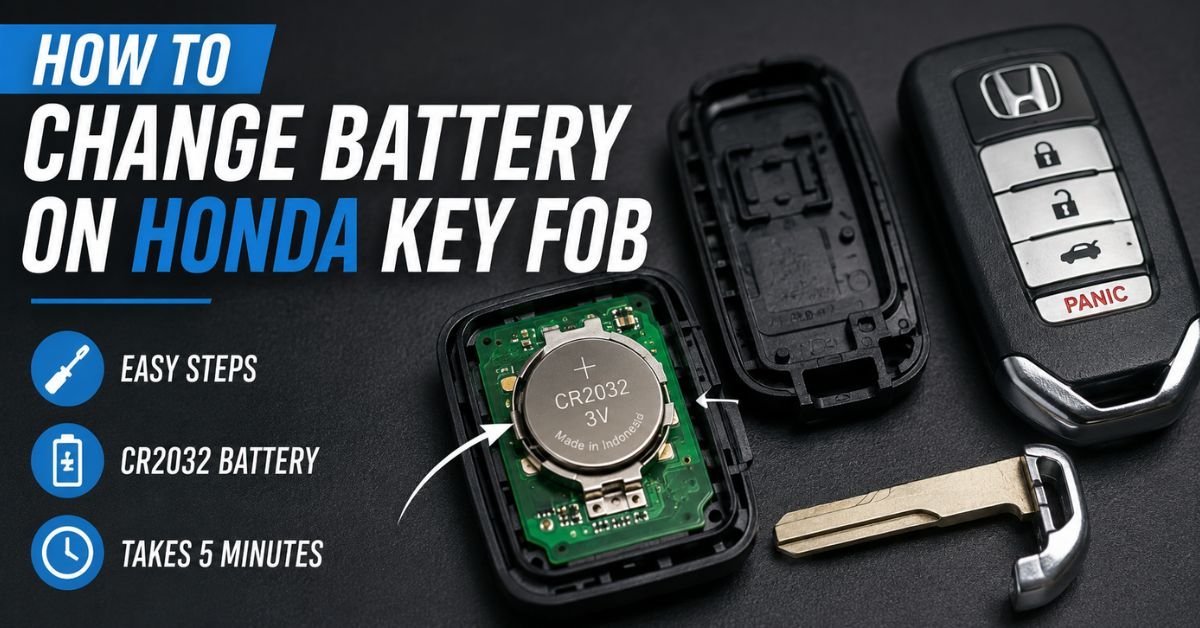
Step 1: Remove the Emergency Key
Most Honda smart key fobs contain a hidden emergency key inside.
To remove it:
- Hold the key fob firmly
- Locate the small release tab
- Slide the tab while pulling out the metal key
Place the emergency key in a secure location.
Step 2: Open the Key Fob
Once the emergency key is removed, you will see a small slot along the seam of the key fob.
Insert a flathead screwdriver or coin into the slot and gently twist. The key fob should pop apart into two sections.
Be careful not to use too much force because the plastic clips can break.
Step 3: Remove the Old Battery
Inside the key fob, you will see the circular battery.
Carefully remove the old battery using your fingers or the edge of the screwdriver. Pay attention to the battery orientation, especially the positive (+) and negative (-) sides.
This will help you install the new battery correctly.
Step 4: Install the New Battery
Insert the new battery into the same position as the old one. Usually, the positive side faces upward.
Make sure the battery sits securely in place and does not move around.
Avoid touching the battery terminals excessively because oils from your fingers can sometimes affect performance.
Step 5: Reassemble the Key Fob
Align the two halves of the key fob and press them together gently until they snap back into place.
Then reinsert the emergency key into the slot.
Your Honda key fob should now be fully functional again.
Must Read: Does a Camper Battery Charge When Plugged Into 30 Amp Power?
Test the Key Fob
Once the battery has been changed, stand close to your car and press every button:
- Lock
- Unlock
- Panic alarm
- Remote start (if equipped)
- Trunk release
If the key fob still does not work, double-check that the battery is installed correctly and that you used the proper battery type.
Do You Need to Reprogram the Key Fob?
After replacing the battery, reprogramming is typically not necessary. Once the new battery is installed, the key fob should work immediately.
However, if the battery was dead for a long time or the internal electronics were damaged, reprogramming may occasionally be necessary.
If your key fob still fails to work after replacing the battery, contact a Honda dealership or professional locksmith for assistance.
Tips to Extend Honda Key Fob Battery Life
Here are a few simple ways to make your key fob battery last longer:
- Avoid leaving the key fob in hot temperatures
- Keep it away from water and moisture
- Do not press buttons unnecessarily
- Keep extra batteries somewhere dry and cool.
- Replace weak batteries quickly to avoid internal damage
Most Honda key fob batteries last between 2 and 4 years depending on usage.
Final Thoughts
Learning how to change the battery on a Honda key fob can save you time and money. Instead of visiting a dealership, you can replace the battery yourself in just a few minutes using a simple coin battery and a small screwdriver.
The process is straightforward: remove the emergency key, open the key fob, swap the old battery for a new one, and snap everything back together. With the correct battery installed, your Honda key fob should work like new again.
Whether you drive a Honda Civic, Accord, CR-V, Pilot, or another Honda model, regular key fob battery maintenance helps ensure reliable access and smooth vehicle operation.