
A Ford key fob is an essential part of modern vehicle convenience. It allows you to lock and unlock your car, open the trunk, and in some models, start the engine remotely. However, like any battery-powered device, the key fob battery will eventually wear out. When this happens, you may notice reduced signal range, delayed response, or the key fob stopping completely. Fortunately, replacing the battery in a Ford key fob is a quick and simple process that most drivers can handle at home without special tools.
In this guide, you’ll learn how to replace the battery in a Ford key fob step-by-step, identify the correct battery type, and avoid common mistakes during replacement.
How to Change a Ford Key Fob’s Battery
Signs Your Ford Key Fob Battery Needs Replacement
Before the battery dies completely, your Ford key fob usually gives warning signs. Here are the most common symptoms:
- The key fob only works at close range
- Buttons require multiple presses
- Remote start stops functioning
- The car displays a “Key Fob Battery Low” warning
- The keyless entry system becomes unreliable
If you notice any of these issues, it’s a good idea to replace the battery as soon as possible.
What Battery Does a Ford Key Fob Use?
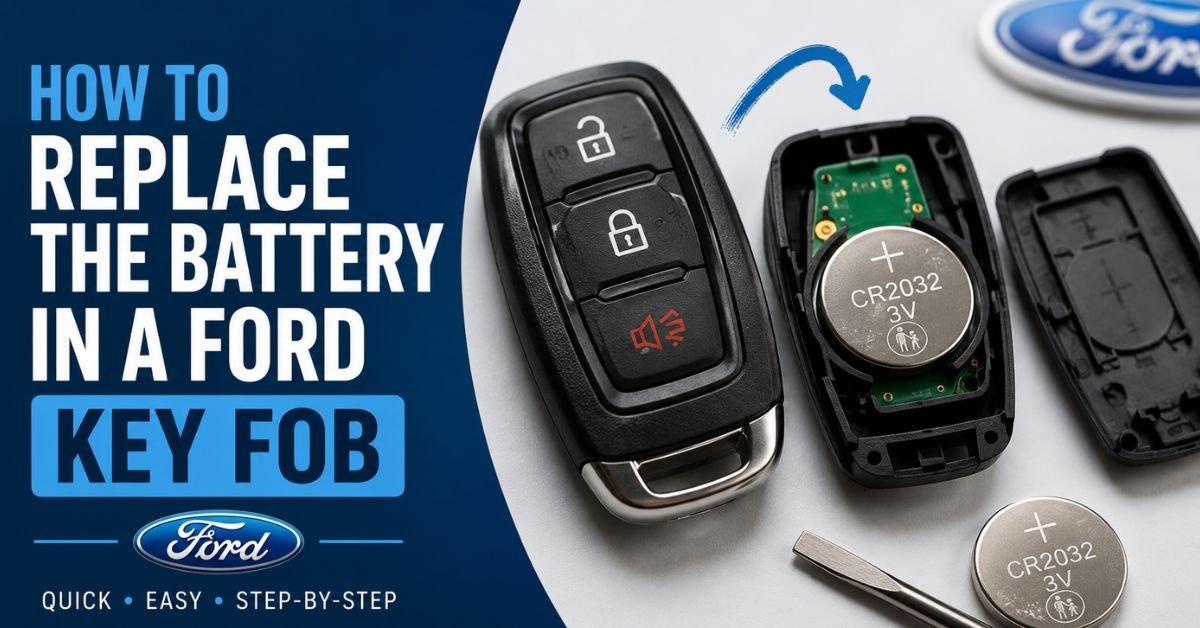
Most Ford key fobs use a CR2032 lithium coin battery, although some older models may use a CR2025 battery instead. To ensure compatibility, check your owner’s manual or open the key fob to confirm the battery number printed on the old battery.
These batteries are inexpensive and widely available at supermarkets, electronics stores, and online retailers.
Tools You May Need
Replacing a Ford key fob battery requires very few tools. In most cases, you’ll only need:
- A small flathead screwdriver or plastic pry tool
- A new CR2032 or CR2025 battery
- A clean cloth or gloves (optional)
Using a plastic pry tool can help prevent scratches on the key fob casing.
Step-by-Step Guide to Replace a Ford Key Fob Battery
Step 1: Remove the Emergency Key
Most modern Ford key fobs include a hidden emergency key inside the fob. Look for a small release button or slider on the back of the key fob.
Press the release mechanism and pull out the emergency key carefully.
Step 2: Open the Key Fob
After removing the emergency key, locate the small seam running along the edge of the key fob.
Insert a flathead screwdriver or pry tool into the seam and gently twist to separate the two halves of the casing. Apply light pressure and work slowly to avoid damaging the clips or plastic housing.
The circuit board and battery compartment will be visible once it is opened.
Step 3: Remove the Old Battery
Carefully take out the old battery. You can use your fingernail or a small screwdriver to lift it from the compartment.
Pay attention to the battery orientation before removing it. In most Ford key fobs, the positive (+) side faces upward.
Avoid touching the electronic components inside the fob unnecessarily.
Step 4: Install the New Battery
Place the new battery in the same spot as the previous one. Make sure it fits securely in the battery tray.
Double-check the polarity to ensure proper installation. Incorrect battery placement can prevent the key fob from working.
Step 5: Reassemble the Key Fob
Align the two halves of the key fob casing and press them together firmly until all clips snap back into place.
Reinsert the emergency key into its slot.
Step 6: Test the Key Fob
Stand near your Ford vehicle and test all functions, including:
- Lock button
- Unlock button
- Panic alarm
- Remote start (if equipped)
If everything works correctly, the battery replacement is complete.
Must Read: How to Change the Battery in a Kia Key Fob?
Common Mistakes to Avoid
When replacing your Ford key fob battery, avoid these common errors:
Using the Wrong Battery Type
Always match the replacement battery with the original one. Installing the wrong size may damage the battery contacts or prevent the key fob from closing properly.
Touching the Battery with Dirty Hands
Oil and moisture from your fingers can reduce battery life. Handle the battery carefully or use gloves if possible.
Forcing the Key Fob Open
Applying too much pressure can crack the casing or break the retaining clips. Pry gently around the edges instead.
Installing the Battery Backward
Incorrect polarity is one of the most common reasons a key fob fails after battery replacement.
How Long Does a Ford Key Fob Battery Last?
A Ford key fob battery typically lasts between 2 and 4 years, depending on usage and environmental conditions. Frequent use of remote start and keyless entry features may shorten battery life.
Keeping a spare battery at home can help you avoid inconvenience if the battery suddenly dies.
Do You Need to Reprogram the Key Fob After Battery Replacement?
In most cases, no reprogramming is required after replacing the battery. Once the new battery is installed, the key fob should work immediately.
However, if the key fob still doesn’t respond, try these steps:
- Remove and reinstall the battery
- Verify the battery orientation
- Ensure the battery is new and fully charged
- Check for damaged battery contacts
If problems continue, the key fob itself may need repair or reprogramming by a Ford dealership or locksmith.
Final Thoughts
Replacing the battery in a Ford key fob is a simple maintenance task that takes only a few minutes. With a small screwdriver and the correct replacement battery, you can restore full functionality to your key fob without visiting a dealership.
Regularly replacing the battery ensures reliable performance for locking, unlocking, and remote start features. By following the steps outlined above, you can safely replace your Ford key fob battery and keep your vehicle access system working smoothly.