
If you’re tuning a BMW using Bootmod3 (BM3), understanding how to measure the camshaft angle is essential. Camshaft angle data helps diagnose timing issues, evaluate VANOS performance, and ensure your engine is operating efficiently. Whether you’re troubleshooting engine performance or optimizing a custom tune, monitoring camshaft angles in BM3 can provide valuable insights.
How to Measure Camshaft Angle in BM3 (Bootmod3): A Complete Beginner’s Guide
In this guide, you’ll learn how to measure camshaft angle in BM3, what the values mean, and how to interpret the data correctly.
What Is Camshaft Angle?
The camshaft angle refers to the position of the intake or exhaust camshaft relative to the crankshaft. Modern BMW engines equipped with Double VANOS continuously adjust camshaft timing to improve:
- Engine power
- Fuel efficiency
- Throttle response
- Torque delivery
- Emissions
The Engine Control Unit (ECU) constantly monitors and adjusts these angles depending on engine speed and load.
What Is BM3 (Bootmod3)?
Bootmod3, commonly known as BM3, is one of the most popular ECU tuning platforms for modern BMW vehicles. It allows users to:
- Flash custom engine tunes
- Monitor live engine data
- Record data logs
- Diagnose engine issues
- Monitor VANOS operation
- Analyze timing and boost performance
One of BM3’s most useful features is Data Logging, where you can monitor real-time camshaft angles.
Why Measure Camshaft Angle?
Monitoring camshaft angles can help identify various engine problems before they become serious.
Common reasons include:
- Checking VANOS operation
- Diagnosing camshaft timing problems
- Detecting stretched timing chains
- Finding faulty camshaft position sensors
- Verifying custom tuning changes
- Comparing requested vs actual camshaft timing
If the measured camshaft angle differs significantly from the ECU target, it may indicate a mechanical or electrical issue.
Information You’ll Need
Before measuring camshaft angles in BM3, you’ll need:
- Bootmod3 installed
- BM3 license
- Compatible OBD adapter (ENET cable or WiFi adapter)
- Smartphone, tablet, or laptop
- BMW with Bootmod3 support
No special mechanical tools are required since BM3 reads data directly from the ECU.
How to Measure Camshaft Angle in BM3
Follow these steps carefully.
Step 1: Connect to the Vehicle
Without starting the engine, turn on the ignition.
Connect your ENET cable or supported wireless adapter to your BMW and launch the Bootmod3 application.
Wait until BM3 establishes communication with the ECU.
Step 2: Open Data Logging
From the main dashboard:
- Select Data Logging
- Create a new log session
- Choose the parameters you want to monitor
Step 3: Select Camshaft Parameters
Depending on your BMW engine, look for parameters similar to:
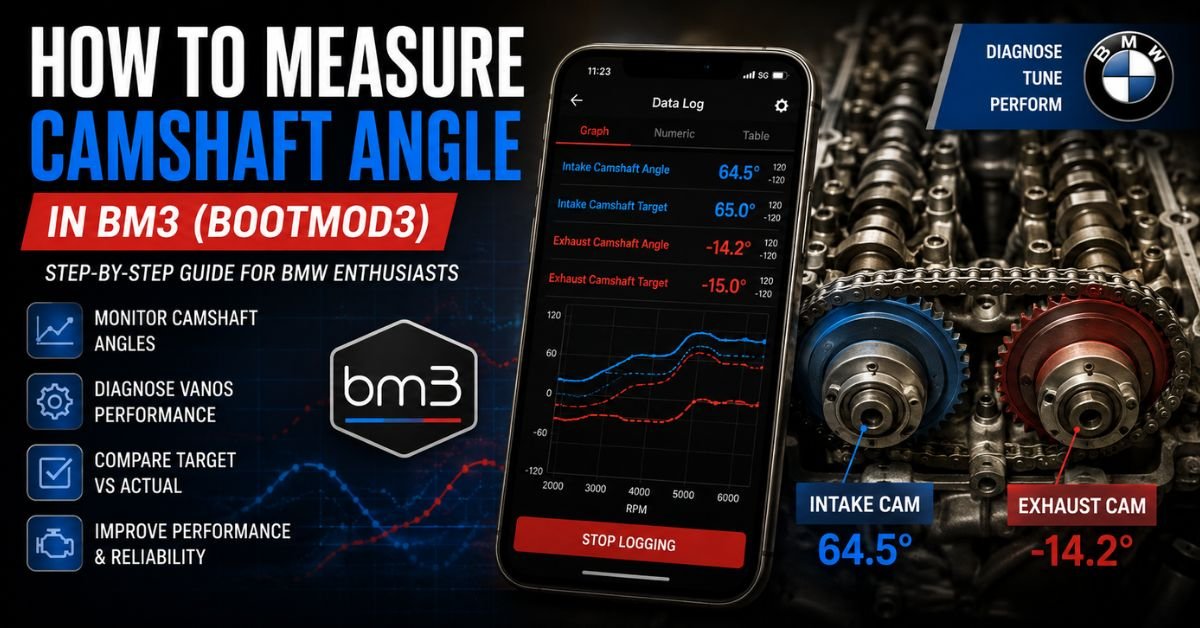
- Intake Camshaft Angle
- Exhaust Camshaft Angle
- Intake Camshaft Target
- Exhaust Camshaft Target
- VANOS Intake Position
- VANOS Exhaust Position
Different BMW engine families (N20, N54, N55, B48, B58, S55, etc.) may display slightly different names.
Step 4: Start the Engine
Start your engine and allow it to reach normal operating temperature.
Cold engine readings may not accurately represent VANOS performance.
Step 5: Begin Data Logging
Press Start Logging inside BM3.
Record data during:
- Idle
- Light acceleration
- Moderate throttle
- Wide Open Throttle (WOT)
This provides a complete picture of camshaft operation.
Step 6: Stop the Log
After collecting sufficient data:
- Stop logging
- Save the log
- Open the recorded graph
You can now analyze camshaft angle behavior.
Understanding Camshaft Angle Values
Normal camshaft angles vary depending on:
- Engine model
- RPM
- Engine load
- ECU calibration
- VANOS commands
At idle, intake and exhaust cam angles often remain relatively stable.
During acceleration, you’ll notice continuous movement as the ECU optimizes valve timing.
The important factor is that:
- Actual angle should closely follow Target angle.
- Large differences may indicate a fault.
What If the Camshaft Angle Looks Incorrect?
Abnormal readings may suggest one or more of the following:
Timing Chain Wear
A stretched timing chain can alter camshaft timing and cause noticeable deviations.
Faulty VANOS Solenoid
Dirty or failing VANOS solenoids may respond slowly or stick.
Camshaft Position Sensor Failure
A faulty sensor can report inaccurate camshaft positions.
Oil Pressure Problems
Appropriate oil pressure is necessary for BMW’s VANOS system to function.
Low oil pressure can reduce timing adjustment accuracy.
Incorrect Mechanical Timing
If timing components were recently replaced, incorrect installation may cause persistent timing errors.
Must Read: What Is a Camshaft Phaser?
Tips for Accurate Measurements
To obtain reliable camshaft angle readings:
- Warm the engine completely.
- Use high-quality engine oil.
- Record multiple logs.
- Compare idle and WOT readings.
- Monitor both intake and exhaust cams together.
- Avoid logging immediately after flashing a tune.
Comparing Target vs Actual Camshaft Angle
One of BM3’s strongest diagnostic tools is comparing:
- Target Cam Angle
- Actual Cam Angle
If both curves closely overlap throughout the RPM range, the VANOS system is generally functioning correctly.
If Actual Angle consistently lags behind or cannot reach the Target Angle, further inspection of the timing system may be necessary.
Common BMW Engines Using BM3
You can monitor camshaft angle on many supported BMW engines, including:
- N20
- N26
- N54
- N55
- B46
- B48
- B58
- S55
- S58 (supported versions)
The available parameters may differ slightly depending on the engine and software version.
Frequently Asked Questions
Can I measure camshaft angle without removing engine parts?
Yes. BM3 reads camshaft angle electronically from the ECU, so no engine disassembly is required.
Is it normal for camshaft angles to change constantly?
Yes. BMW’s VANOS system continuously adjusts cam timing based on engine operating conditions.
Should intake and exhaust camshaft angles always match?
No. Intake and exhaust cams are controlled independently and often operate at different angles depending on engine demand.
Does a camshaft angle error always mean the timing chain is bad?
No. Incorrect readings can also result from faulty VANOS solenoids, camshaft sensors, oil pressure issues, or wiring problems.
Conclusion
Learning how to measure camshaft angle in BM3 is a valuable skill for any BMW enthusiast or tuner. By using Bootmod3’s built-in data logging features, you can monitor intake and exhaust camshaft positions, compare actual versus target values, and quickly identify potential issues with the VANOS system, timing chain, or camshaft sensors.
Regularly reviewing camshaft angle logs not only helps diagnose engine problems early but also ensures your BMW performs at its best after tuning or maintenance. Whether you’re running a stock setup or a custom BM3 tune, keeping an eye on camshaft angle data is an excellent way to maintain engine reliability and performance.